Deal intelligence in ten minutes. Not ten weeks.
One paste and you're up and running. No implementation project, no fields to design, no integrations to wait for, no bot on the call. Ten minutes after the meeting you know what your client actually said, who decides, what's slipping and what to do next, with the words it came from. The enterprise stack takes a quarter and a hire to switch on. This takes a transcript.
Most companies under fifty run their pipeline in a spreadsheet, a free CRM nobody updates, or someone's head. This is the fourth option. Nobody types into it.
No bot on the call. Works with Fireflies, Fathom, Otter, tl;dv, Zoom, Meet or a Plaud recorder. Import your spreadsheet; export any time.
Value, stage and close date come from what the client said, each with its line. Where the meeting didn't say, the scanner asks you before the next one.
What it takes to get a legacy CRM working. And what it takes here.
Worked back from the vendors' own implementation guides, their own surveys and the price lists. Left: the stack a company under fifty is told it needs for real deal intelligence. Right: the paste.
Annual contract per seat. A mandatory onboarding fee. Pro tier or above, because the insight features live there.
4 to 8 weeks for a company of 1 to 50 with one or two integrations; 3 to 6 months at 50 to 500. Each extra integration adds 2 to 4 weeks.
Pipelines, stages, probabilities, required fields, who may edit what. Decided now, argued about forever.
Call intelligence on top: seats, a platform fee, its own onboarding, a bot that joins your calls. Or the CRM's own AI, on a higher tier, in beta, metered in credits.
A fifth to two fifths of someone's job, permanently, plus an optimisation budget every year and a licence uplift every renewal.
Reps spend about 40% of the week selling. Note-taking and data entry are the tasks they name as most time-consuming. Even with AI, the rep approves every field.
A record 35% of salespeople completely trust. 76% of CRM users say under half their data is accurate and complete. The insight layer's accuracy assumes hygiene you were buying it to get.
Or forward the recap email your recorder already sends. The record assembles itself, with the words it came from.
Claim, counter or drop. Lock and publish. The only typing is a yes.
They read it and act on it with no account. You preview exactly what they'll see first.
Figures: implementation timelines from published Salesforce implementation guides; selling time, admin load and trust from Salesforce's State of Sales 2026; data completeness from Validity's State of CRM Data Management 2025; year-one stack cost built from list prices and third-party pricing teardowns, ten seats, CRM plus call intelligence.
You paste once. The deal record fills itself, twenty-six ways.
A CRM asks you to type after every call, and most of it never gets typed. MeetApp.ai reads the meeting and proposes the record; you confirm the actions and answer two questions by email. Below is what comes back for that effort, every line carrying the words it came from.
Or forward the recap email, or let your recorder post it.
Claim, counter or drop. Lock and publish.
Only for what the meeting didn't say. Usually nothing.
Five fields. One email. No form.
A pipeline needs five things a conversation doesn't always say: value, stage, expected close, owner and source. MeetApp.ai prefills each from an exact quote when there is one, so "we're looking at about 1.2" becomes a value with its line, and marks what it couldn't. Before the next meeting, one plain-text email asks for the gaps, with lettered options. Reply "1a, 2b" and the record is true again.
It asks only what the next meeting needs and only what the transcript didn't answer. Most weeks that is nothing. The scanner never asks your client anything.
- Who signs on their side?
- a) Thandi M. (Operations)
- b) R. Khumalo (Finance), they said "Finance will want the number locked", 9 Oct
- c) Someone else
- Answer:
- Is the second site in this deal or a separate one?
- a) In this deal
- b) Separate deal
- Answer:
Do this next: send fixed pricing through December, then get Finance into a meeting.
A pipeline that reads itself.
Deals by stage with their value, built from your meetings. Today shows what moved, what slipped and the one thing next up. Six deal-health signals sit under every deal, each a plain sentence, not a score, so a Friday review takes ten minutes and nobody is asked "where are we with Northwind?". Forecasting stays deliberately simple: stage, value and date, nothing clever.
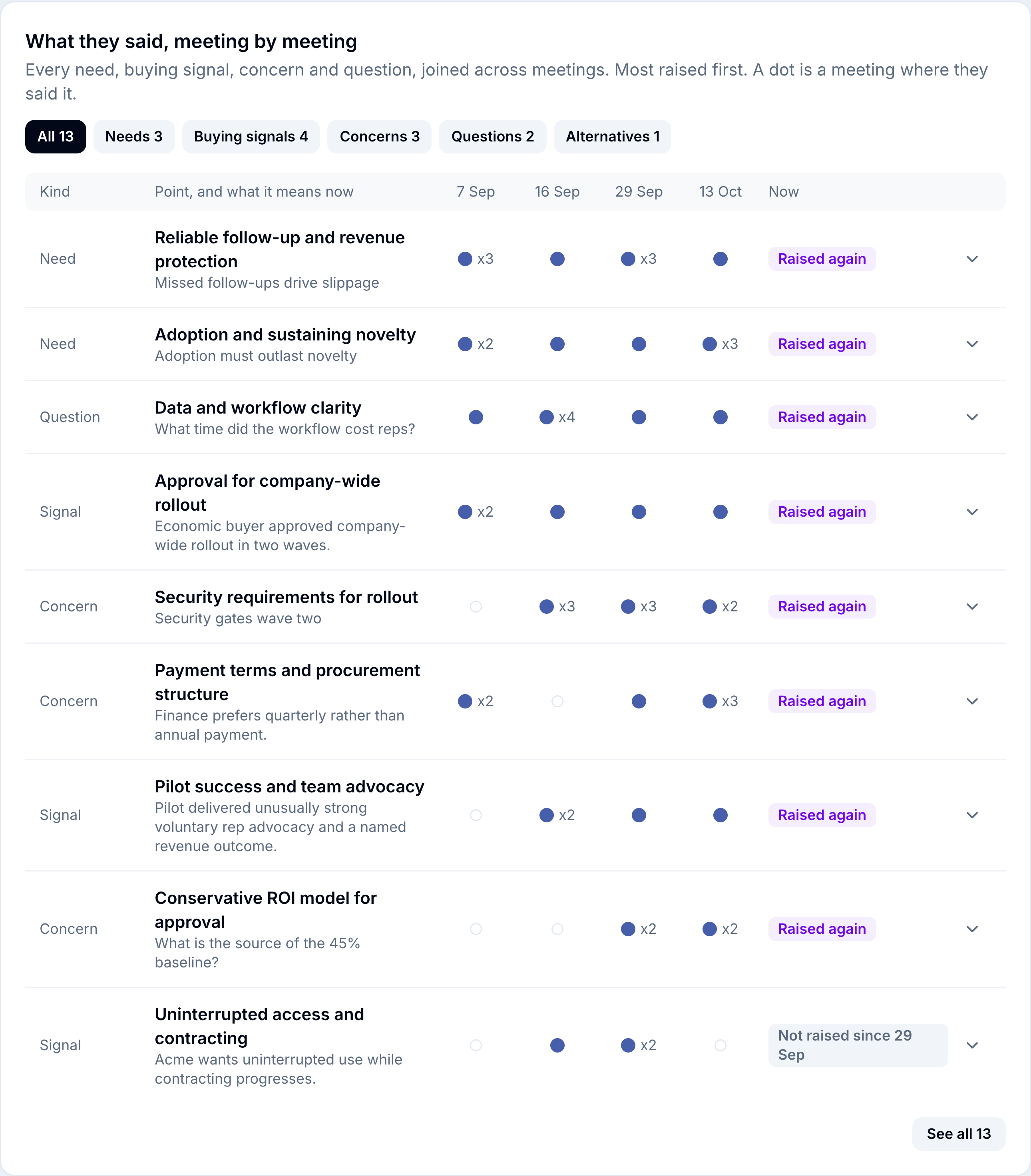
The client's own words, joined across every meeting.
Every need, buying signal, concern, question and alternative the client voiced, joined into threads across the whole deal. Each row carries the point in their words, what it means now, and a status only a multi-meeting record can give: New on a date, Raised again, or Not raised since. Lines your own side said are dropped before they can be mistaken for the client's. Every row opens where it was said.
It is the difference between "I think they're worried about price" and "They raised price on 29 September, again on the 9th, and Finance signs."
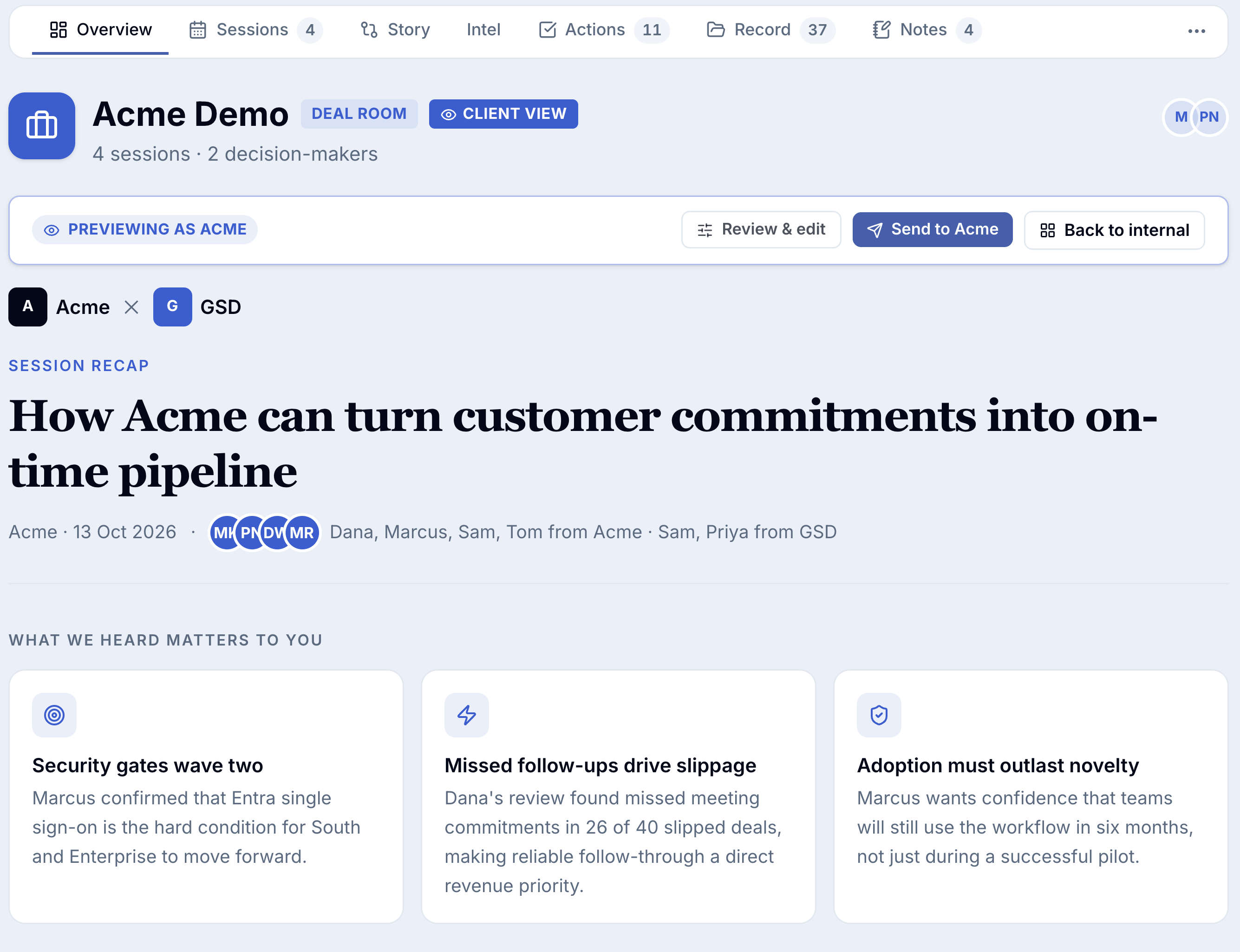
Your client sees a recap, not a recording. And acts on it without an account.
A CRM is a private diary. This is a shared record. Each person outside the room gets their own link; they accept, push back, ask for more time, mark done, reply and forward it to the colleagues who have to say yes, each of whom gets a 60-second read for their role. A forwarded link asks "Is this Pieter?". What they see is built separately from your record: your intel, your stage, your read of the people and anyone else's address can never reach it, and a test checks that on every release.
Before the first call, you know who's waiting on you.
Who is waiting on you, who you are waiting on, what is due today and what has not been accepted yet, built from the record with no AI in the loop. Plus the threads that went quiet across your deals, with a Review link.
- Northwind: fixed pricing through December peak, due today.
- Harbour Fresh: revised SLA wording, due Thursday.
- Thandi M.: Finance sign-off route, not accepted yet.
- Pieter V.: second site shortlist, due Friday.
- Atlas Freight: who signs, asked Tuesday.
What every client pushes back on, in their words.
The same threads rolled up across the pipeline: what they push back on, what they ask, where they are unsure, what they need and what lands. Patterns a CRM never had, because nobody typed them, with the quotes to prove it.
How a company of fifteen actually runs its pipeline.
HubSpot and Salesforce both sell to fifteen-person companies, at the free and starter tiers, where the deal intelligence isn't. The stack that has it is sold to revenue teams with a RevOps function. So at fifteen the real choice is one of these.
| A spreadsheet | A free or starter CRM | Someone's head | The enterprise stack | MeetApp.ai | |
|---|---|---|---|---|---|
| What it is | Google Sheets, a Notion board | HubSpot Free or Starter, Salesforce Starter (built for up to ten users), Pipedrive | The founder or the best rep | A Professional or Enterprise CRM plus call intelligence: Gong, Clari or the CRM's own AI tier | The deal record, derived from your meetings |
| Seen at fifteen people? | Everywhere | Everywhere. This is where most fifteen-person companies actually are | Everywhere | Rarely. Sold to revenue teams; reviewers note little flexibility for smaller companies; platform fees and onboarding assume a RevOps owner | Built for it |
| Pros | Free, instant, everyone can edit it | Free or cheap to start; contacts, email and deals in one place; forms and sequences; a clear upgrade path | Fast, complete, full of nuance; no software | Real deal intelligence, forecasting, coaching, every channel captured; boards and finance trust it | Day one, nothing to configure; the client's own words joined across meetings; both sides' commitments with a clock; a view the client can act on; one licence |
| Cons | Decays on the first busy week; no history, no client view, no record of what was said | Empty by month three; the insight features sit on paid tiers, behind a bot and metered credits; it holds what the rep typed | Leaves when they do; nobody can check it; it is the only system that gets worse on holiday | A quarter and part of a hire to switch on; per seat plus platform fees and uplifts; the rep still feeds it; 35% of salespeople completely trust the result; the client sees nothing | Meetings only: no lead capture, no email sequences, no web forms; a new habit to keep, one paste per meeting; forecasting kept deliberately simple |
| Who fills it in | Whoever remembers on Friday | Nobody, after week three | Nobody needs to | The rep, approving what the AI proposed, field by field | The meeting. You confirm; one email covers the rest |
| Is it true on Friday | Last updated three weeks ago | "Next step: follow up" | Ask them | As true as the hygiene the forecast assumes | Every field dated to the meeting or the reply that set it |
| Does the client see it | No | No | No | No | Their own view, acted on without an account |
| Across meetings | A longer notes cell | An activity log, if logged | Vaguely | Topic trackers and call summaries | Threads: new, raised again, not raised since |
| Year one, ten sellers | Nothing | Nothing to about $2k | Nothing, until they leave | $12k to $50k at list, before implementation | One licence for the whole company |
| Time to value | Today | Today, for the contact list; a quarter and an upgrade for the insight | Today | A quarter | Ten minutes |
| When you grow | Export to a CRM, retype the history | Upgrade, per seat, and switch the insight on | Hire, and hope | You're already there | Export any time; the record goes with you |
The honest reading: at fifteen people you are choosing between something free that goes stale and something expensive you can't justify. The stack isn't wrong, it's priced and built for a company you aren't yet. MeetApp.ai is the record for the years in between, and the one that already knows your clients when you get there.
Consultancies, agencies, software and engineering studios, advisors, architects, anyone whose deals take four conversations and a proposal. Five to fifty people. Under about fifty open deals. No SDR team, no RevOps, and nobody whose job is keeping the CRM honest.
Inbound lead forms, outbound sequences, five hundred contacts a month, a sale that closes on the first call. Your record starts at the lead; ours starts at the first meeting. A booking link covers the gap for most people; if it doesn't cover yours, you need the other kind of CRM.
Short, plain, provable.
Transcripts are saved first; everything else is derived and can be re-derived. Import from a spreadsheet, export to one any time. A system of record you can leave is the only kind worth trusting.
Their view is built separately and tested on every release. Not your notes, your stage, your read of the people in the room or anyone else's address.
Every line carries the words it came from, checked against the transcript before it is stored. Any line can be marked "Not right". The briefing and the on-time record use no AI at all.
One licence for the whole company.
The budget line you already have for a CRM, spent once for everyone. No per-seat maths, no metered AI credits. Your clients, guests and the colleagues you forward to never sign up and never pay. You pay to start deal rooms.
Paste your last client meeting. In a few minutes you'll have the record, the client view and the first two threads. Bring the spreadsheet when you're ready; it imports in one go.
For deals that happen in meetings, yes: the pipeline, the people, the promises and far more than HubSpot ever held. For web forms, chat widgets and email sequences, no. Keep both if you need both; the record exports.
Yes. Bring your spreadsheet or CRM export; deals, values, stages and dates land as the starting record. From then on the meetings keep it true.
Not our job. A booking link and your inbox cover it for most meeting-led businesses. The record starts when the first conversation does.
Paste or forward one transcript per meeting, confirm the actions, and answer one email when the meeting left a gap. Most weeks the email doesn't come.
No, and that is the point. It reads the transcript your recorder already makes. No bot joins the call.
No. A personal link, or a six-digit code to keep reading on another device. A forwarded link checks who is reading.
Paste your last client meeting.
One paste. The deal record, both sides' commitments and a client view ready to send. Nobody types into it.
Works with the recorder you already use. Import your spreadsheet; export any time.